
28 oct. 2026 - XC Coach, a free post-flight coach for Condor 3 pilots, opens to everyone today at virtualgliding.fai.org/xc-coach. It is the first release of the Virtual Gliding Innovation Program, which the FAI recognised with the H.R.H. Prince Alvaro de Orleans-Borbon Grant at its General Conference in Lausanne on 14 October.
A promise kept
When we received the grant in Lausanne, we made a promise: the money would not stay in a plan. It would turn into tools that every virtual glider pilot can use, starting this season.
Two weeks later, the first one is live. XC Coach takes the flight you just flew in Condor and tells you, with numbers, where you gained time, where you lost it and what to practise next.
What XC Coach is
XC Coach reads the flight track that Condor 3 saves after every flight, the .ftr file, and turns it into a full debrief. Think of it as the post-flight talk with an experienced coach, built on the data your simulator already records.
It scores your task exactly as it should do in any gliding contest, to the second and the metre. It then goes through every thermal and every glide, and builds a training plan from Helmut Reichmann's cross-country curriculum around your weakest points.
Everything is computed in your browser. Your flight file never leaves your computer; only a short summary of the figures is sent to the AI coach that writes your debrief.
What you can do with it
Check your task result. Start time, every turnpoint crossing, task time, speed and distance, matched to any scoring tool analysis. The task sheet lists each point with its zone type, radius, height limits and coordinates, and flags any start or finish rule you broke.
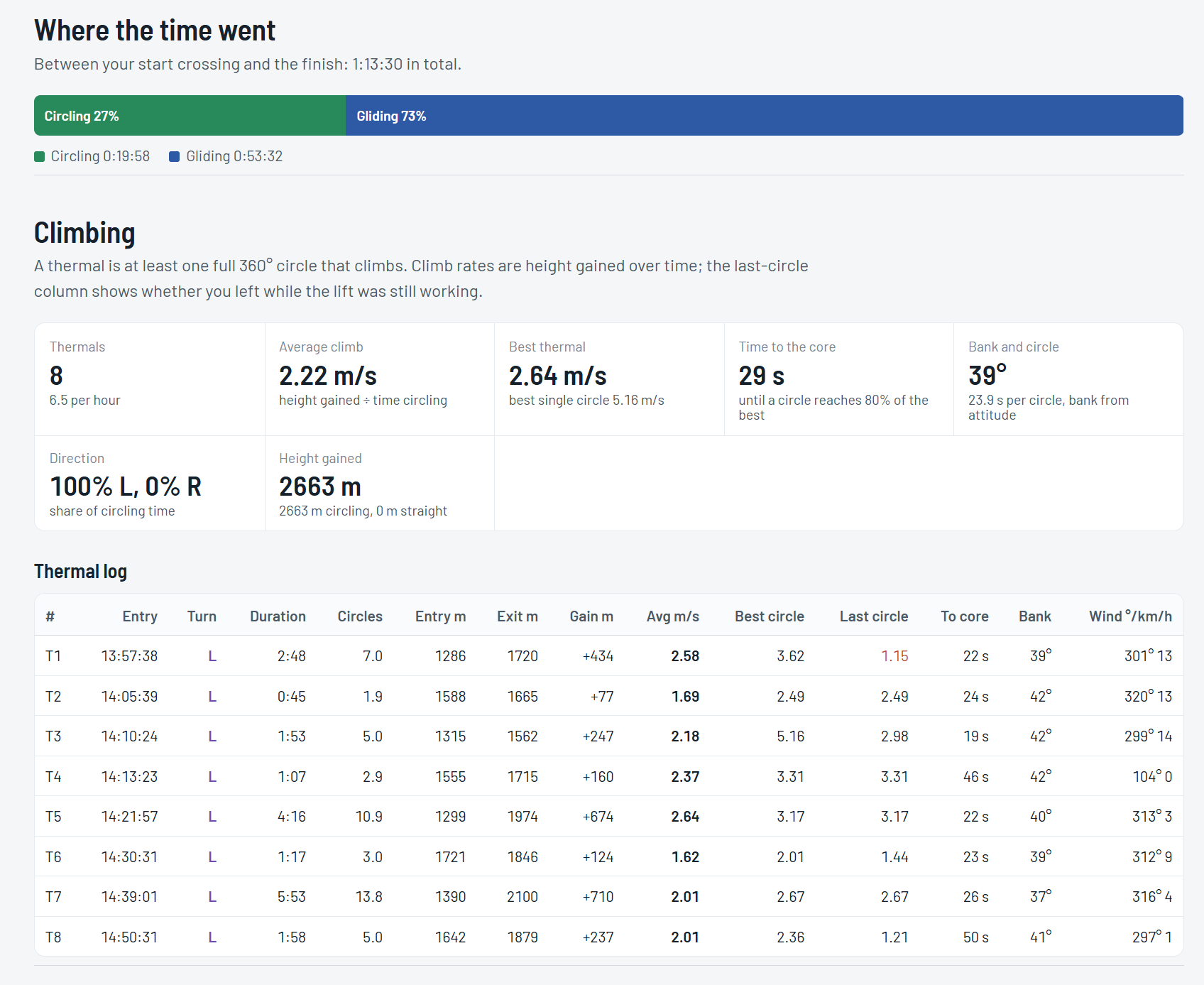
Understand your climbing. A log of every thermal, with average and best climb, your last circle, time to centre the core, bank angle and turn direction. Climbs in straight flight, on ridges, wave or streets, are counted separately.
Measure your gliding. The glide ratio you achieved between each thermal exit and the next entry, compared with your glider's polar at the speed you flew and at your real wing loading, water ballast included. You also see the air you flew through, the MacCready setting you actually flew and how well you used lift on the way.
Review your route and the wind. The shortest possible route through the zones next to the distance you really flew, how far you went inside each turnpoint, and the wind measured in every thermal.
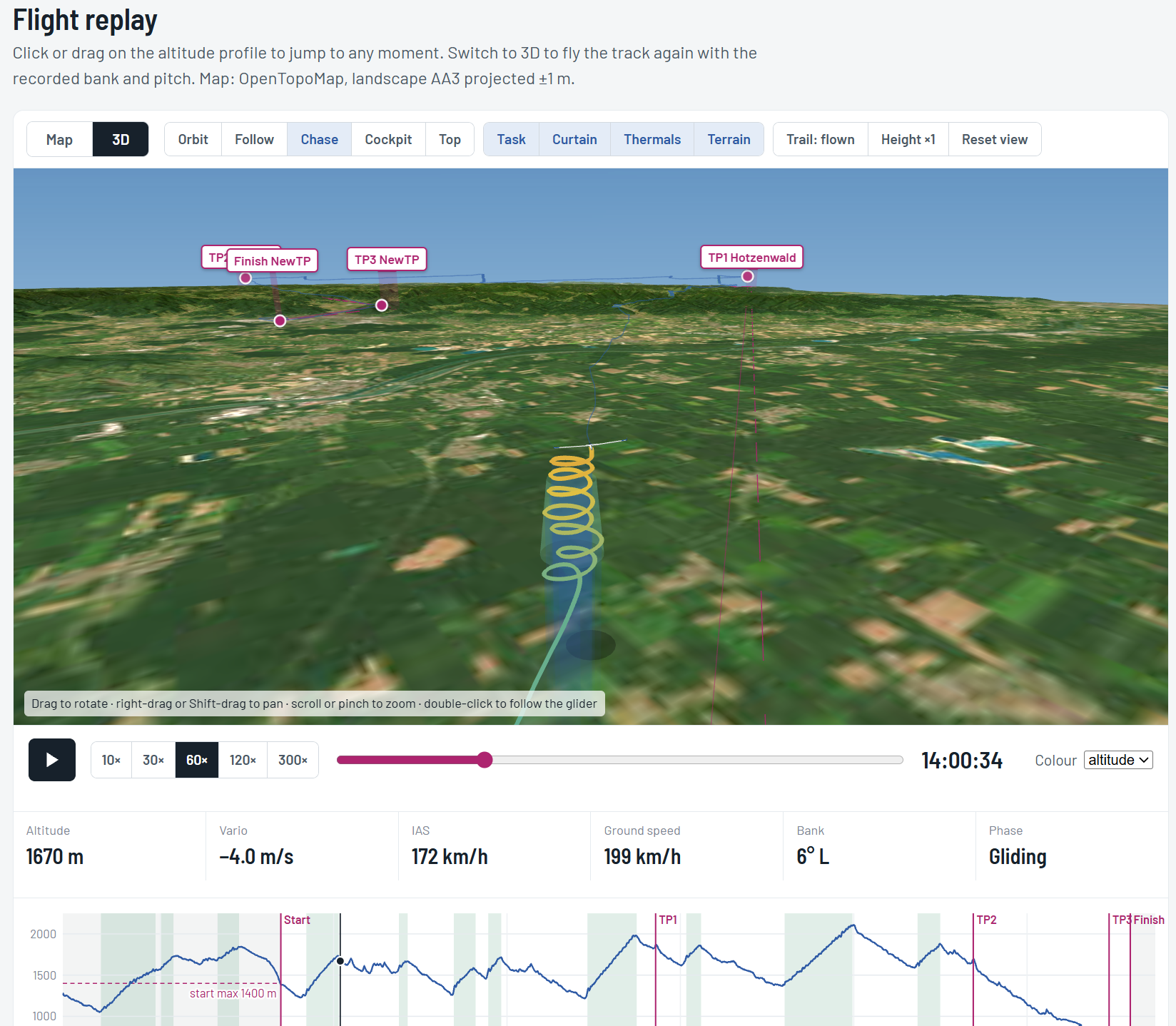
Replay the flight, in 2D and in 3D. Follow the track on a terrain map with the altitude profile, or switch to 3D and fly it again with the bank, pitch and heading Condor recorded. Orbit, follow, chase or cockpit cameras, task zones drawn with their height limits, thermal columns coloured by strength, real terrain and satellite imagery, all at up to 300 times real speed.
Get a training plan. Three exercises from Reichmann's curriculum, chosen from your numbers, each with the figure that triggered it, plus a drill of the week.
Read your coach's debrief. A short AI-written debrief in English, French, German, Italian, Spanish, Polish or Czech, based only on the measured facts.
Keep a record. Download the whole analysis as a PDF report, with the map and the altitude profile.
Try it now
Fly a task in Condor 3, online or offline.
Find the flight track in Documents\Condor3\FlightTracks on your computer.
Open virtualgliding.fai.org/xc-coach and drop the .ftr file onto the page.
Your debrief appears in a second. XC Coach is free, needs no account and works with any .ftr file, from a training flight to a Virtual Gliding race.
What comes next
XC Coach is the first step of the Virtual Gliding Innovation Program, not the last. More tools for pilots, organisers and spectators will follow over the coming months, funded by the grant and built with the community.
You can help shape them. Fly, upload your tracks, and tell us what XC Coach gets right, what it misses and what you would like to see next. Good flights!